MAY Installation
Java Development Kit
You will need to install the Java Development Kit (JDK), at least version 11 (as previous versions are not supported anymore).You can download it here if you don't have it already:
- https://adoptopenjdk.net/installation.html
- or https://www.oracle.com/technetwork/java/javase/downloads/
Eclipse
You will need the Eclipse 2020-12 distribution. The "Standard" or "For Java Developers" editions will be fine:
https://www.eclipse.org/downloads/packages/release/2020-12/r/eclipse-ide-java-developers
If you are behind a proxy you may need to configure Eclipse for it, but this is out of scope of this installation guide.
Add the Make Agents Yourself Update Site
Now you are ready to install the MAY plugin for Eclipse. For that, you need to add its update site:
Go to Help / Install New Software...
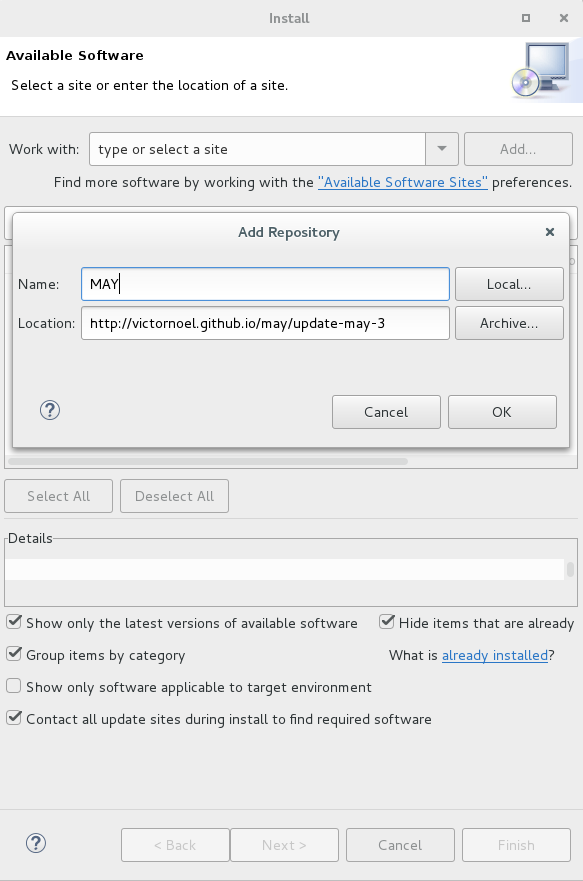
Click Add... and enter the following information:
Name: MAY
Location: https://victornoel.github.io/may/update-may-3
Install the Make Agents Yourself Plugin
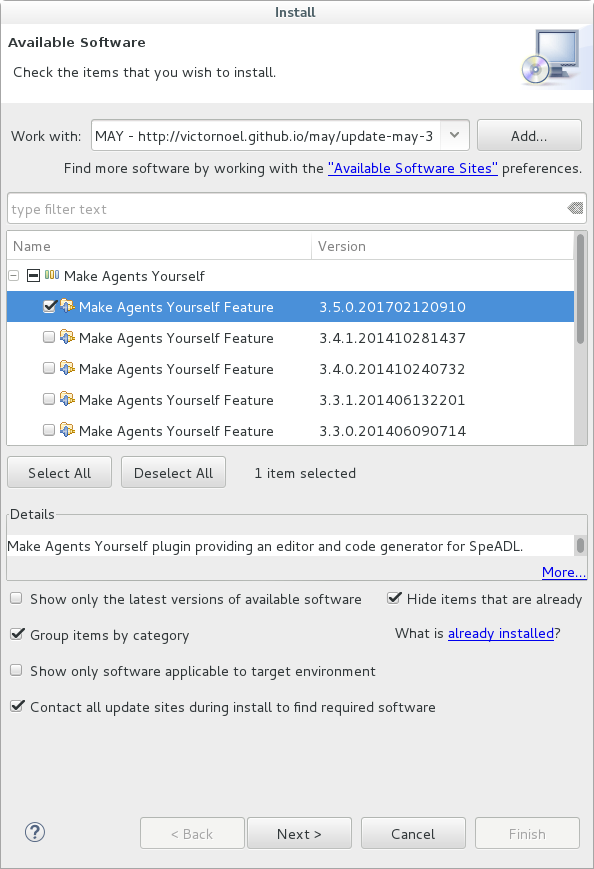
Then in order to actually install the plugin, select the MAY update site in the drop-down list.
Expand the Make Agents Yourself category and select the desired version (the last is at the top).
Then click Next and it will take some time calculating requirements and dependencies.
Click Next again when it shows you the install details and accept the terms of the licence agreements, then Finish.
Click OK when you get the security warning, and accept to restart Eclipse now.
Next Steps
Next, you can create an Eclipse project and define a SpeADL architecture using MAY.
See MAY Project Setup for a quick overview of how to create a MAY Project.
↑ recommended reading!
Wiki Page Resources
Mis à jour par Anonyme il y a plus de 5 ans · 111 révisions