MAY Project Setup » Historique » Révision 73
« Précédent |
Révision 73/74
(diff)
| Suivant »
Anonyme, 21/03/2021 20:29
Project Setup
Create a Java Project
First, create a Java project in File / New / Java Project.
Choose a name, and click Finish.
Note: verify that the chosen execution environment is Java 1.8 or greater (e.g., JavaSE-11)
Add a SpeADL File
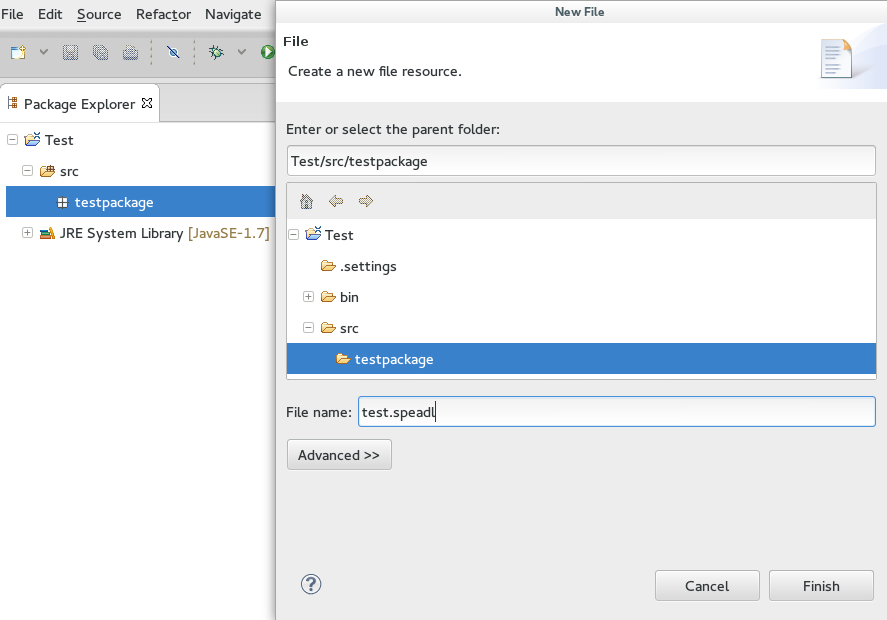
Right-click on the src folder (or any desired sub-package) and select New / File.
Choose a name with a ".speadl" extension and click Finish.
Open the SpeADL File (and Enable the Xtext Project Nature)
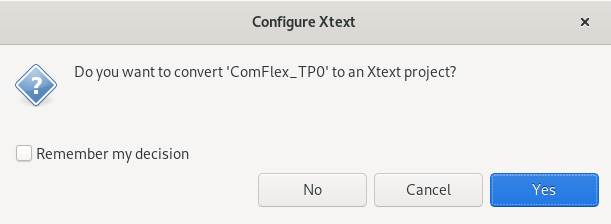
Double-click on the file.speadl and if asked (typically with Eclipse ≥ 2020-12), enable Xtext by clicking on Yes in the dialog.
Next Steps
Next, you can configure Eclipse to use Maven if you want to exploit the reusable components for MAY: MAY Maven Eclipse Setup.
Wiki Page Resources
Mis à jour par Anonyme il y a plus de 5 ans · 74 révisions